Drives & Permissions
An app connects to an account and gets two things from it: drives to write to, and the account’s sharing key to read and publish shared data with. Both are the user’s to grant. An app says what it needs when it connects, or asks later; the user answers on the connect screen, and can change the answer at any time in Swarm ID.
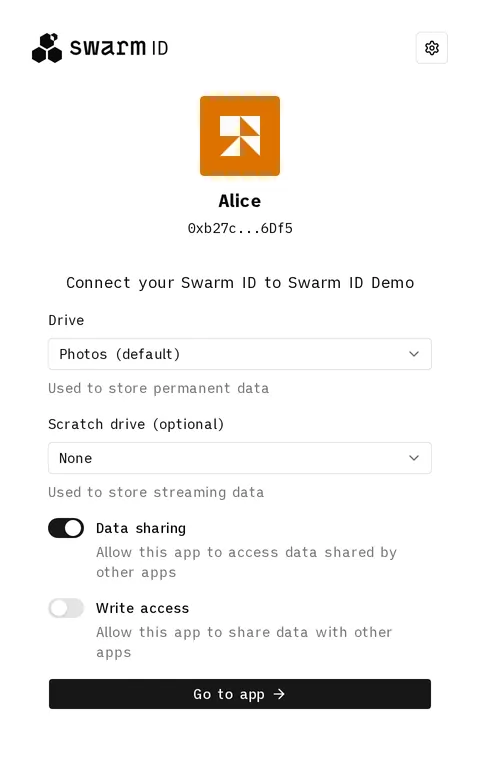
The connect screen asks for what the app needs: here a drive, an optional scratch drive, and the two sharing switches.
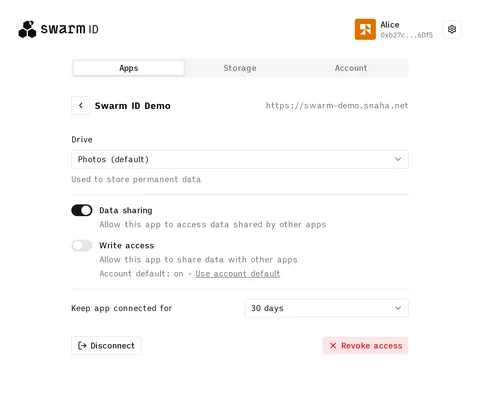
Later, the app’s own page under Apps shows everything it holds, and every control there applies as it is changed.
Drives
Section titled “Drives”A drive is a prepaid postage batch the user bought or attached on the identity site’s Storage tab. Every drive is regular or scratch, chosen when it is added and fixed after that:
- A regular drive stores data permanently. Once a part of it is full, uploads that land there are refused.
- A scratch drive overwrites its oldest data instead. It never fills up, which suits streaming and live feeds: the newest data is what matters and older data may go. See Scratch drives for what that costs.
The account has a default drive: the first regular drive it got, or the one the user marked on the Storage tab. The account itself syncs to it, and it is what an app gets when it asks for nothing in particular.
Asking at connect
Section titled “Asking at connect”permissions.drives on the client says what the connect screen asks for:
drives |
What the user sees | What the app gets |
|---|---|---|
| absent | Nothing, or a choice among several regular drives on a first connect | The account default, followed wherever it moves |
| a list of rows | One row per entry, each a select over the user’s drives of that kind with Add new drive… at the end, regular rows first. A required row starts on a free drive of its kind; an optional one on none |
Exactly the drives picked, in row order |
'all' |
One Grant this app full drive access checkbox, with a warning | Every drive the account has, including ones added later |
[] |
Nothing | No drive: uploads go through the subsidised gateway if there is one |
const client = new SwarmIdClient({ // … permissions: { drives: [ { kind: 'regular', description: 'Used to store your messages' }, { kind: 'scratch', optional: true }, ], },})A row’s description replaces the helper text under it. The user may grant fewer than asked: an
optional row left empty is simply not granted, and the app finds out from
getDrives().
Writing to a drive
Section titled “Writing to a drive”The app’s primary drive is its first granted regular drive, or the account default for an
'all' grant and for no request. A write that names no drive goes there. Any other granted drive,
a scratch drive included, is named on the write with its batch id:
const drives = await client.getDrives()const scratch = drives.find((drive) => drive.kind === 'scratch')await client.uploadData(frame, { batchID: scratch?.batchID })A scratch drive is never the primary, so a write that names nothing never lands on one. Naming a
drive outside the grant rejects with drive-not-granted.
Asking later
Section titled “Asking later”A viewer who starts streaming needs a scratch drive the app did not ask for at connect.
requestDrives() opens the Permissions for <app> popup
with only the rows asked for, and resolves with what the app holds once it closes, granted or not.
Call it from a click, as connect().
button.onclick = async () => { const drives = await client.requestDrives([{ kind: 'scratch' }]) const scratch = drives.find((drive) => drive.kind === 'scratch') if (!scratch) return showStreamingUnavailable() startStreaming(scratch.batchID)}What the user can change
Section titled “What the user can change”On the app’s page under Apps, the user can swap a drive, set one to None to take it away,
or untick full drive access. The change reaches the app’s live session at once: onDrivesChange
and onConnectionChange fire, getDrives() reflects it, and an upload in flight on a drive taken
away is aborted. Both fire when a drive expires while the page is open too, whether or not the
app has written to it, with uploadUnavailableReason: "stamp-expired" once it was the primary, so
an app that caches canUpload need not poll. The session re-reads each drive’s remaining lifetime
from the chain halfway to its stored expiry, at least every six hours, and again at the expiry
before it refuses the drive, so a storage price change or a top-up made elsewhere moves the moment
rather than the refusal being wrong in either direction. Each drive’s batchTTL comes with where it
was read from (batchTTLSource) and when (batchTTLMeasuredAt), so an estimate can be shown as one
and an exact reading aged. A drive bought moments ago is held back as stamp-warming-up for the
ten blocks Bee waits before stamping with a new batch, under a minute on Gnosis; usable is
false meanwhile, and both callbacks fire when the wait is over, so an app that queued an upload
behind a purchase needs no polling loop. A hidden tab’s timers run late by up to a minute. onDrivesChange is the one to use for the drives alone: it carries no
payload and fires for nothing else.
Scratch drives
Section titled “Scratch drives”Data on a scratch drive can be overwritten at any time. Swarm ID does not restrict what an app puts there, so anything that depends on older chunks being present is at risk:
- Files span several chunks, and they can be evicted one at a time, leaving a file that no longer reads back whole.
- Sequential feeds look updates up from index 0. Once early updates are evicted the feed can read as empty.
- Epoch feeds find the latest update through older nodes of the epoch tree.
- ACT keeps its grantee history as a feed, with the same exposure.
Write data that must last to a regular drive, and keep only what can be lost on a scratch one.
How it works: a postage batch is split into buckets, and each device of an account writes its own lane of every bucket (Postage Batch Sharing). On a scratch drive a full lane wraps: the next chunk in that bucket reuses the lane’s oldest slot, and Bee replaces the chunk stored there because the new stamp is newer. Nothing else changes, so two devices still never write the same lane at once. Consequences worth knowing:
- Device clocks must be correct. An overwrite only lands when its stamp is newer than the one it replaces. A device whose clock runs behind can fail to overwrite after it takes over a lane.
- Apps sharing a scratch drive share its lanes, so one app’s writes overwrite another’s once the lane wraps.
- Resizing changes the size of each lane, so the next few writes after it land on slots that are not the oldest.
- Usage is not shown for a scratch drive: once it wraps it always reads as full, which says nothing about whether it still accepts writes.
Permissions
Section titled “Permissions”Besides its own origin-bound app key, every app the account connects can reach the account-wide sharing key: the key other people grant to when they share something with this person in every app, rather than in one (Which key do I grant to?). Two switches decide what an app may do with it:
- Data sharing — read what was shared with the sharing key, and see it as
identity.sharingPublicKey. Off, the key is withheld from the app altogether. - Write access — publish and manage shares as the identity (
publisher: "identity"onactUploadData, and adding or revoking grantees of such a share). Never on without data sharing.
The app key is never gated: a share made out to it, or published by it, works whatever the switches say. Drives are not affected either.
Defaults, and per app
Section titled “Defaults, and per app”Both switches are on by default. The user sets the account-wide defaults at the top of the Apps tab, and can pin either switch the other way for one app on that app’s page. A pin survives later changes to the default until the user takes Use account default; an app pinned apart from the defaults is marked Custom permissions in the list. The app’s own Keep app connected for on the same page works the same way.
Asking
Section titled “Asking”An app asks for a switch the way it asks for a drive, at connect or later:
const client = new SwarmIdClient({ // … permissions: { dataSharing: true, writeAccess: true },})The connect screen shows only a switch that is not already on for this app, off, for the user to turn on; write access sits disabled until data sharing is on. A switch turned on is pinned for the app with the connection; one the user left off is not granted.
Later, requestPermissions() opens the same popup with
any mix of drives and switches, and resolves with what the app holds once it closes. When every
switch asked for is already on and no drive was asked, nothing opens.
const { writeAccess } = await client.requestPermissions({ writeAccess: true })if (!writeAccess) return showSharingUnavailable()await client.actUploadData(data, grantees, { publisher: 'identity' })Checking, and being refused
Section titled “Checking, and being refused”getPermissions() returns the two booleans in effect, and the same two
ride connectionInfo.permissions, so a switch the user flips while the app runs arrives through
onConnectionChange. Check before a call that needs one, and ask before failing.
A call that needs a switch that is off rejects with permission-denied, with permission naming
the switch. On a download the proxy still tries both of the app’s keys, and refuses only when the
sharing key is the one the share names: the error means “ask the user”, never “not a grantee”.
try { const data = await client.actDownloadData(encryptedRef, historyRef, publisherKey)} catch (error) { if (!(error instanceof SwarmIdError)) throw error if (error.code === 'permission-denied' && error.permission === 'dataSharing') { await client.requestPermissions({ dataSharing: true }) }}What the user can change
Section titled “What the user can change”The same page under Apps: either switch, back to the account default, and how long the app stays connected. Disconnect ends the session and keeps what the app held for its next connect; Revoke access forgets the app, its drives and its pins.